AI Haunted House

Transform your photos into terrifying haunted house videos with the Haunted House Video Generator. This AI tool adds monsters, ghosts, and eerie effects to create horror clips in minute. Enjoy easy sharing, instant results, and professional quality—perfect for social media, pranks, or creative projects. Experience fast, free horror video generation today!

Drag & Drop or Ctrl+V to paste

Support PNG, JPG, WEBP up to 10MB (Max 2 images)

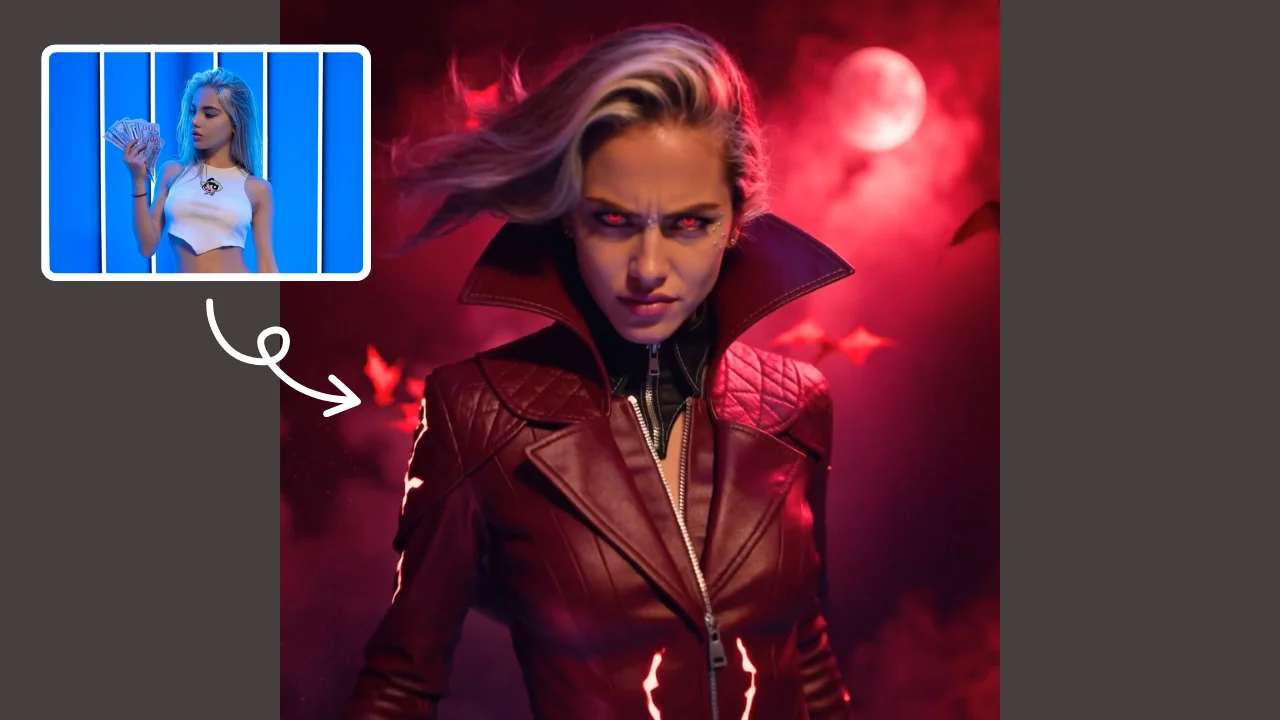
This is an example of what AI can create. Generate your own video now!

What is an AI Haunted House Video Generator?

An AI Haunted House video generator is an online tool that uses artificial intelligence to transform ordinary photos into short, dynamic horror clips. By analyzing a submitted image, the AI applies cinematic effects, adding elements like spectral ghosts, lurking monsters, and eerie lighting to create a terrifying narrative. In under a minute, you get a professional-quality video where the subject of your photo appears to be trapped in a paranormal event, making it perfect for social media, creative projects, or just for fun.

How the Haunted House Video Generator Works

The process of creating your own spooky scene is surprisingly simple, leveraging complex AI models to do the heavy lifting. You don't need any video editing experience; the entire workflow is designed for instant results.

From Still Image to Terrifying Scene

The core technology relies on advanced video generation models, such as Sora 2 or Veo 3.1. When you upload a photo, the AI analyzes the key subjects—like people or pets—and understands the background composition. It then uses a specific video prompt to guide the generation. For instance, a common prompt might be: "The character in the picture suddenly falls into a haunted house, is surrounded by monsters and ghosts around, and the video ends with their scream." The AI renders this narrative frame by frame, ensuring the original characters move and react naturally within the new, horrifying environment.

Video Rendering and Processing

Once you select your desired aspect ratio (like 16:9 for widescreen or 9:16 for TikTok and Reels) and duration (typically 10 seconds), the video rendering begins. This process, which usually takes between one to three minutes, happens on the tool's servers. This client-side processing means your computer isn't doing the heavy work, and the operation is fast and secure. The final output is a seamless clip where reality blends with digital horror.

Key Features of Top Horror Video Generators

When using a tool like the Haunted House Video Generator, you'll encounter several features designed to give you control and quality. Understanding these can help you get the best possible result.

Scene Creation and Customization

The magic lies in the scene creation. You aren't just adding a filter; you're generating a complete narrative. The AI doesn't just place a monster in the corner; it integrates monsters and ghosts into the action, making them interact with the light and shadow of the original photo. This creates a cohesive and believable horror clip. You can often experiment with different horror styles, from classic haunted house themes to more modern, creature-feature aesthetics, by selecting different AI models, each offering a unique approach to scene creation.

Technical Aspects: Duration, Ratio, and Models

To ensure your video fits its intended use, you have control over several technical parameters. The standard duration of 10 seconds is perfect for capturing a quick scare without overstaying its welcome. You can choose between a 16:9 aspect ratio for YouTube or a 9:16 vertical format for social media stories. The choice of AI model, such as Sora 2 or Veo 3.1, can influence the video's style and rendering quality, allowing you to convert your photo with a touch that ranges from hyper-realistic to artistically stylized.

When and Why You Need an AI Video Generator

This technology isn't just for tech enthusiasts; it solves a real problem for anyone who needs quick, engaging visual content. The days of needing expensive software and hours of work to create effects are over.

Social Media and Entertainment

For social media managers and casual users alike, standing out is key. An AI Haunted House video is an immediate attention-grabber. Imagine creating a personalized Halloween greeting for your Instagram story, or a hilarious prank video where your friend is chased by a ghost, all generated in minutes. These tools provide a fast and efficient way to generate shareable content that sparks engagement.

Creative Projects and Pranks

Beyond social media, these generators are a boon for creative projects. Filmmakers can use them for rapid storyboarding of horror scenes. Teachers can create engaging content for creative writing classes. And for pure entertainment, using a photo of a family member as the star of a short horror clip is a guaranteed way to get a reaction. The tool transforms a simple idea into a professional-quality video, making sophisticated effects accessible to everyone.

A Step-by-Step Guide to Using the Haunted House Tool

Ready to create your own terrifying clip? Here is a straightforward workflow to get you started.

  1. Select Your Image: Choose a clear photo where the subject is well-lit and centered. This helps the AI model accurately identify the main character for the video.
  2. Configure Your Settings: Pick your preferred aspect ratio (9:16 for vertical, 16:9 for horizontal) and the video duration (10 seconds is a great start).
  3. Choose an AI Model: If options are available, select a model like Sora 2 or Veo 3.1. This choice can affect the final style and rendering speed.
  4. Generate the Video: Hit the generate button. The video rendering will begin, and you'll typically have your clip ready in 1-3 minutes.
  5. Review and Share: Once processing is complete, watch your horror clip. You can then easily download and share it directly to your favorite platforms.

Why Choose an Online AI Tool Over Manual Editing?

The primary advantage of using an online tool is the combination of speed, ease of use, and quality. Manual video editing to achieve similar horror effects would require hours of work in complex software like After Effects, demanding a steep learning curve. In contrast, an AI Haunted House generator automates the entire process. It's browser-based, requiring no software installation, and delivers accurate, high-quality results instantly. The process is also secure, as your images are processed for the sole purpose of generating your video.

Frequently Asked Questions

How does an AI Haunted House generator turn my photo into a video?

The AI analyzes the people and objects in your photo. It then uses a pre-defined video prompt, like one describing a fall into a haunted house, to generate new frames that follow a short narrative. The AI maintains the likeness of your original subjects while animating them within a new, spooky scene filled with monsters and ghosts.

Is it safe to upload my personal photos to an online tool?

Reputable online tools prioritize user privacy and data security. The processing is typically automated, and images are used only for the video generation task. While it's always wise to use trusted platforms, these tools are generally designed with trustworthiness in mind and do not store your photos longer than necessary to create your video.

What are the typical uses for an AI Haunted House video?

People use these videos for a wide range of purposes. The most common uses include creating engaging content for social media platforms like TikTok and Instagram, making personalized Halloween greetings, producing fun prank videos for friends, and even for rapid prototyping in creative projects to visualize horror concepts quickly.

How long does it take to generate a video and what does it cost?

The video rendering process is quite fast, typically completing within one to three minutes. Many basic versions of these tools offer a free tier, allowing you to experience fast, free horror video generation. More advanced options or higher-resolution outputs may require a nominal credit system, where different AI models like Sora 2 might cost a few credits per generation.

Can I control how long the final horror clip is?

Yes, you usually have control over the video duration. The most common and effective length for these types of clips is around 10 seconds. This duration is long enough to establish a scary scene and complete a simple action, making it ideal for the short attention spans of social media feeds.

What if my video doesn't turn out the way I expected?

Video generation is an evolving technology, and results can sometimes vary. If the first result isn't perfect, you can often try again with a different AI model or a slightly different input photo. The key is that the process is so fast and efficient that you can experiment multiple times until you achieve a horror clip that you're happy with.

Conclusion

The AI Haunted House video generator represents a significant leap in making complex video effects accessible to everyone. By combining powerful AI models with an intuitive online interface, it allows anyone to transform a simple photo into a professional-quality horror clip in minutes. Whether you're looking to boost your social media engagement, create a unique prank, or simply explore the possibilities of AI video generation, this tool offers a fast, secure, and creative way to bring your spooky visions to life.

Start Creating AI Videos Instantly

Turn simple text prompts into engaging videos using our powerful AI video generator. No editing skills required — just describe your idea and let AI do the work.

Generate Your First AI Video

More AI Video Tools

Explore more AI-powered video creation tools to expand your creativity

AI Tongue Out Face

AI Tongue Out Face

AI Tongue Out Face provides free, user-friendly AI video templates. Transform images and text into engaging videos in one click. Its standout feature includes quirky effects like the tongue-out face, enhancing creativity for social media or marketing. Save time, no skills needed, and produce viral-ready content effortlessly.

Try Now
AI Iron Man

AI Iron Man

AI Iron Man Transformation lets you instantly turn into Tony Stark by uploading your photo. Generate a dynamic Iron Man video , showcasing your superhero avatar with realistic effects. Enjoy quick, fun transformations and share your unique Iron Man identity easily.

Try Now
AI Jiggle Video

AI Jiggle Video

AI Jiggle Video uses advanced AI to animate your photos with dynamic wobble effects. Turn static images into entertaining, bopping dance clips effortlessly. Enjoy a user-friendly interface, instant sharing options, and no cost to start. Perfect for creating viral, fun content that stands out and engages audiences.

Try Now
AI Hip Shake

AI Hip Shake

Hip Shake is an AI-powered tool that creates engaging hip-twist videos for free. It uses advanced effects to produce captivating dance content, helping users boost social media presence and engagement quickly. Ideal for creators seeking viral potential.

Try Now
AI French Kiss Video Generator

AI French Kiss Video Generator

The AI French Kiss Video Generator by Supermaker AI lets you produce high-quality romantic videos effortlessly. Using advanced AI, it simulates realistic kissing scenes, saving time and enhancing creativity for filmmakers and content creators. Enjoy user-friendly controls and instant results to elevate your romantic storytelling.

Try Now
AI Fake Boyfriend

AI Fake Boyfriend

Fake Boyfriend Filter lets you generate a personalized AI boyfriend in videos. Simply upload your photo and detail your desired scenes—like hugging or kissing. The tool crafts realistic interactions for entertainment or content creation, offering unique, engaging experiences powered by advanced AI technology.

Try Now
AI Face Punch

AI Face Punch

AI Face Punch offers intuitive AI video templates that let you transform text or images into engaging videos instantly. Its key features include diverse template options, one-click generation, and seamless customization, saving time while enhancing visual content quality. Perfect for marketers and creators seeking fast, professional results without technical skills.

Try Now
AI Shocked Face

AI Shocked Face

AI Shocked Face uses advanced AI to detect faces in your photos and replace their expressions with realistic shocked looks. Simply upload an image, and our tool automatically generates a surprised version in minute. It's free, easy to use, and great for creating funny content to share with friends or on social platforms. Experience the magic of AI expression transformation today!

Try Now
×

Unlock Premium AI Video Generator Features

Sign in with Google to access advanced editing tools, save your creations, and enjoy unlimited image enhancements.